

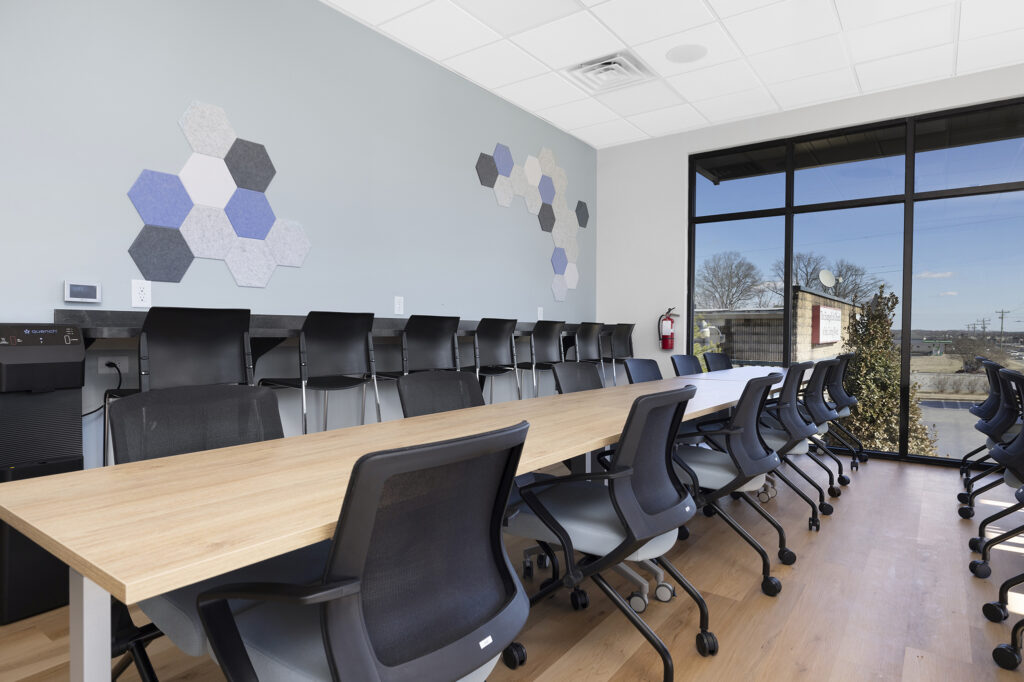
If you are looking for ergonomic office furniture for your workplace, the right choice depends on more than picking a chair with a lumbar curve. All the pieces have to work together (seating, desks, accessories and layout) and they have to fit the way your team uses the space.
At TNT Commercial, we handle the full process: sourcing, specifying and installing ergonomic office furniture for businesses across Charlotte and the Southeast. This office ergonomics guide covers what to look for in each category, what common mistakes cost employers later and how our workplace furnishing services make it easy to get it right the first time.
Why Ergonomics Matter Beyond Employee Comfort
Ergonomic office furniture is a common request when companies are fitting out a new space or refreshing an existing one. The business impact goes well beyond whether employees feel comfortable at their desks.
Productivity
Research on the Positive outcomes of office ergonomics in terms of higher productivity found that ergonomic improvements in office environments produced average productivity gains across participating workplaces.
When your team spends 8 hours a day at a workstation, how that station is set up directly affects output. Keeping this in mind, correctly specified ergonomic furniture is one of the highest-leverage investments a workplace can make.
Retention
Workspace quality is a visible signal of how much a company invests in its people.
Employees who rate their physical work environment poorly are more likely to disengage. When a new hire walks into a thoughtfully furnished office with quality ergonomic seating and well-organized workstations, it communicates something about the business that job listings alone cannot.
Risk management
Musculoskeletal disorders, such as back pain, wrist strain and neck problems, are the leading category of workplace injury costs in office environments and account for roughly a third of all workers’ compensation costs in white-collar workplaces, according to OSHA data.
Poorly specified seating and workstations increase long-term claims exposure. Investing in ergonomic furniture is, in part, a decision about risk.
When TNT Commercial furnishes an office, we assess how the space will be used before recommending any product. The right ergonomic specification for a law firm looks different from the right specification for a creative studio or a financial services team. That’s easy to overlook without the right knowledge.
Task Chairs: What to Look for at Office Scale
The task chair matters most for ergonomics. Getting it right (or wrong) shows up fast in how your team feels over time.
Start with BIFMA certification
BIFMA (Business and Institutional Furniture Manufacturers Association) sets the commercial seating standard: ANSI/BIFMA X5.1. It tests strength, stability and durability. A BIFMA-certified chair is built for daily commercial use, which is exactly what you need.
Adjustability is what makes a chair work
One chair that fits one person isn’t a workplace solution. You’re specifying for a whole team, with different body types and needs.
Here’s a quick checklist for chair adjustability:
- Seat height adjusts (typically 16–21 inches).
- Seat depth adjusts.
- Lumbar support adjusts in height and depth.
- Armrests adjust in height, width and pivot.
- No fixed armrests (they only fit a narrow range of body sizes).
Materials matter beyond looks
Commercial fabric needs to survive daily wear in a way home fabric doesn’t. The material you choose also affects comfort, cleaning and how the chair holds up over years of use.
Here are some of the most widely used and trendy office furniture materials, along with their pros and cons.
| Material | Pros | Cons | Best for |
|---|---|---|---|
| Mesh | Excellent breathability, no heat buildup, lightweight, easy to spot-clean | Less plush feel, can sag over many years, harder to repair if torn | Open-plan offices, warmer climates, long sit times |
| Woven commercial fabric (polyester/nylon blends) | Wide color range, good breathability, moderate cost, hits 50,000+ double rubs at commercial grade | Absorbs odors and spills more than vinyl, needs periodic professional cleaning | General office use, most private offices and open-plan seating |
| Performance fabric (e.g. Crypton-type) | Built-in moisture and stain resistance, easier cleanup, holds commercial abrasion ratings well | Higher cost than standard fabric, fewer color options | High-traffic reception seating, shared/hot-desk chairs |
| Vinyl / polyurethane (PU) | Wipes clean instantly, resists spills and stains, budget-friendly | Less breathable, can crack or peel over years, feels less premium | Reception areas, break rooms, healthcare, high-turnover seating |
| Bonded leather | Leather look at a lower price point, easy initial wipe-down | Peels and cracks with regular commercial use, often within 2–3 years | Not generally recommended for commercial use |
| Genuine leather | Premium look and feel, very durable when maintained, ages well | Highest cost, needs conditioning, less breathable | Executive offices, client-facing spaces, conference rooms |
Most commercial fit-outs land on woven or performance fabric for general workstations. These are the best balance of cost, comfort and durability. Mesh suits high-density or warm-climate offices. Leather and vinyl work best as targeted choices (executive vs. high-turnover) rather than a default.
Checklist on material specs to confirm (regardless of material chosen):
- Fabric rated 50,000+ double rubs (Wyzenbeek abrasion test) is the bar for heavy commercial use.
- CAL 117 fire resistance certification.
- GREENGUARD certification (low chemical emissions) often required for LEED or healthcare spaces.
- Not a residential-grade fabric (these aren’t tested to any of the above).

TNT sources task chairs directly from manufacturers, so we can get you sample units before a volume order. We also deliver, assemble and set up correct height adjustment at every desk so your team sits right from day one.
Sit-Stand Desks: Are They Worth It?
Height-adjustable desks cost $200–$600 more per desk than fixed ones. At 20, 50, or 100 workstations, that’s real money. So it’s fair to ask if it’s worth it.
What makes a sit-stand desk “commercial grade”:
- Dual-motor lift (more stable and reliable than single-motor over time).
- Weight capacity covers your full equipment load (dual monitors, docking station, etc.).
- Programmable height presets (essential for shared desks).
- Easy one-touch adjustment (manual adjustment = people stop bothering and you lose the benefit)
Where sit-stand usually isn’t worth it:
- Collaborative benching areas.
- Reception desks.
- Conference room seating.
We help identify which workstations actually benefit from height adjustment, so the FF&E budget goes where it matters.
Recommended sit-stand desks by tier
There’s a real gap between consumer-grade standing desks sold direct-to-home and true contract-grade desks built for daily commercial use, multi-year warranties and integration with office systems furniture. At office scale, the second category is what holds up.
| Tier | Examples | Why it fits |
|---|---|---|
| Value / high-volume | Uplift commercial line, ESI, Ergotron WorkFit | Solid dual-motor performance at a lower per-unit cost. Reasonable choice for large open-plan rollouts. |
| Mid-tier commercial | Steelcase Migration SE, Herman Miller Nevi, Haworth height-adjustable lines | Built for daily commercial use, simple programmable presets, strong multi-year warranties. |
| Premium / flagship | Herman Miller Aeron Chair, Renew or Motia, Steelcase Ology | Smoothest one-touch operation, highest weight capacity, most configuration options (finishes, cable management, pinch-detection safety features). Best suited to executive offices or client-facing spaces. |
Monitor Arms, Keyboard Trays & Accessories
Chairs and desks are the foundation. Accessories are what make a workstation comfortable and they’re what people complain about missing after move-in.
Core accessories (highest ergonomic impact):
- Monitor arm – top of screen at or just below eye level, screen at arm’s length.
- Keyboard tray keeps elbows at a 90–110° angle. High-impact for typing-heavy roles.
- Cable management, especially at sit-stand desks, where loose cables create resistance and discourage people from adjusting height.
- CPU holder / docking station mount keeps the tower or dock off the floor and desk surface, protected from foot traffic and dust.
- Footrest for shorter users at fixed-height desks. It keeps knees at the correct angle when seat height is set for the desk rather than the person.
Nice-to-have (lower cost, high complaint rate if missing):
- Anti-fatigue mat for standing positions. Without one, people revert to sitting faster because standing on hard flooring gets uncomfortable.
- Wrist rest / palm support.
- Laptop riser pairs with an external keyboard and mouse for hybrid/laptop-first roles, avoiding “laptop neck” from a low built-in screen.
- Privacy or acoustic desk screen ties into open-plan noise management.
- Headset or headphone hook.
Acoustics & Lighting in Open-Plan Offices
Furniture alone won’t fix everything. Noise and light affect how people feel and focus and both can be handled at the furnishing stage, no separate renovation needed.
Noise
Background noise above roughly 55–65 dB hurts focus-heavy work. Most open-plan offices hit this range during busy hours from conversation, HVAC and shared equipment.
Checklist for reducing noise:
- Acoustic panels and soft furnishings in high-traffic or high-noise zones.
- Spatial zoning to separate quiet/focus areas from collaboration areas.
- Acoustic glass walls for enclosed spaces where sound containment matters (conference rooms, HR suites, legal or healthcare offices).
See more noise reduction tips for commercial spaces in our acoustic office design guide.
For enclosed rooms where conversations genuinely need to stay private furniture-level fixes like panels aren’t enough.
This is where acoustic glass wall systems come in: laminated or double-glazed panels with acoustic gaskets and seals at the frame, floor and ceiling junctions.
Standard laminated acoustic glass achieves STC ratings of 35–42; high-performance double-glazed assemblies reach STC 45–52. TNT specifies and installs these systems as part of our architectural glass wall offering, so acoustic performance can be built into a conference room or private office from the start rather than retrofitted later.
Light
Glare from windows or overhead lighting causes eye strain that builds up over the day.
Checklist for reducing glare:
- Position monitor arms with window glare in mind.
- Add task lighting at each workstation.
- Consider glass wall placement and glazing type (fritted or filmed glass) where transparency and glare control both matter.
- Plan this during furnishing, not as a retrofit later (much cheaper).
How TNT Specs Ergonomic Furniture for a Full Office
If you are furnishing a new office, refreshing an existing one, or expanding into a larger space, here is how our workplace furnishing process works:
1. Needs assessment
We start by understanding how your space will be used: headcount, roles, working patterns, any existing furniture to retain and your timeline.
This conversation shapes every specification decision that follows. A 20-person professional services firm and a 20-person creative studio may need very different ergonomic setups even in identically-sized spaces.
2. Space planning and workstation layout
Before product selection, we review the floor plan and identify where sit-stand desks make the most sense, where collaborative zones should be and how traffic flow affects workstation orientation.
Ergonomic furniture for the office begins with layout. A correctly specified chair in a poorly planned workstation still produces strain over time.
3. Product specification and sourcing
We specify products by role and use case, not one-size-fits-all.
Private offices may warrant a different chair tier than open-plan workstations. Roles with heavy typing hours benefit more from keyboard trays than roles that are primarily on calls.
We source from manufacturers with direct relationships, which gives us access to commercial pricing and the ability to request sample units before you commit at volume.
4. Delivery and installation
We handle the full delivery and installation. Furniture arrives assembled, positioned and adjusted:
- Every chair is adjusted to fit the user who will sit in it.
- Every monitor arm is set at the correct height.
- Every desk is programmed with the user’s preferred presets.
This is the step that most purchasing-only approaches skip and that makes the largest difference to actual adoption.
5. Post-installation review
For larger projects, we return at 30 days to confirm the setup is working as intended. Employee ergonomic needs vary and a brief walkthrough after the team has been in the space for a month catches small adjustments before they become recurring discomfort issues.
Ready to Furnish Your Office?
TNT Commercial specifies, sources and installs ergonomic office furniture for businesses across Charlotte, NC and the Southeast. Tell us your headcount, layout and timeline. We’ll handle everything from there.
Frequently Asked Questions
What is ergonomic office furniture?
Ergonomic office furniture is designed to support the body’s natural posture and reduce physical strain during extended use. In a commercial context, this means adjustable task chairs, height-adjustable desks, monitor arms and keyboard trays specified to fit the range of users in a workplace, not a single person at a home office desk.
What should I look for in an ergonomic office chair?
Look for BIFMA certification (commercial-grade durability), a full range of adjustments including seat height, lumbar depth and height and armrests that adjust in height, width and pivot. The chair should accommodate the range of body types across your team. Request a sample unit before committing to orders above 20 chairs.
How much does ergonomic office furniture cost for a business?
A fully specified ergonomic workstation (task chair, height-adjustable desk, monitor arm and keyboard tray) typically runs $1,500–$3,500 per workstation depending on specification tier and order volume. Learn more about pricing matters in our commercial furniture buying guide.
Do I need sit-stand desks for every workstation?
Not necessarily. Sit-stand desks deliver the most value at workstations where users spend the majority of the day seated and focused (standard office roles, administrative positions, finance and similar). Collaborative benching areas, reception positions and conference settings typically warrant fixed-height solutions. A workplace furnishing consultation helps identify where the investment has the most impact.

 info@tntcommercial.com